Showing posts with label HCI. Show all posts

Monday, December 2, 2019

ExploreVM Podcast Season 3 Episode 7 - HCI Series - StorMagic

Today we tackle the last episode in the Hyperconverged series.

As I mentioned in previous episodes, the goal for this series is to help build an understanding of hyperconverged infrastructure, it's place in the datacenter world, and spotlight the various ways that vendors are deploying HCI.

Once again, I have contacted the vendors directly ( or have been contacted) to participate.

That being said, this is NOT a sponsored series.
I am not receiving any sort of compensation for these appearances.
And all vendors appearing have had a strict set of rules laid out for their appearance.

1) No Bashing other HCI Vendors
2) Keep it technical, this is a technical podcast
3) This is NOT a free commercial for your product
4) No bashing other HCI Vendors


Links:

And thank you for listening.

This was the last scheduled HCI Series episode, but if you would like to speak to your product please do not hesitate to reach out. I would love to schedule more HCI related episodes. 

If you'd like to be a guest on the ExploreVM podcast, have a show idea for a future episode, or to continue the conversation on today's topics, please contact me at Email, Facebook, or Twitter

Wednesday, November 13, 2019

ExploreVM Podcast Season 3 Episode 6 - HCI Series: Nutanix

In this episode we continue with the HCI series. This round, Nutanix gets their turn.
The goal for this series is to help build an understanding of hyperconverged infrastructure, it's place in the data center world, and spotlight the various ways that vendors are deploying HCI.

Now, we are going to approach this series a bit differently as I've reached out to the vendors directly to appear on the show versus the usual community members that I have on as guests.

That being said, this is NOT a sponsored series.
I am not receiving any sort of compensation for these appearances.
And all vendors appearing have had a strict set of rules laid out for their appearance.

1) No Bashing other HCI Vendors
2) Keep it technical, this is a technical podcast
3) This is NOT a free commercial for your product
4) No bashing other HCI Vendors

Listen to "Season 3 Episode 6: HCI Series - Nutanix" on Spreaker.

Links
Dwayne Lessner - Twitter
Nutanix Community - Twitter

If you'd like to be a guest on the ExploreVM podcast, have a show idea for a future episode, or to continue the conversation on today's topics, please contact me at Email, Facebook, or Twitter

Monday, October 28, 2019

ExploreVM Podcast Season 3 Episode 4: VMworld 2019 Pt 2

In a two part series, we take a look at VMworld 2019, some of the announcements, and the community around the convention.

Part 2 features discussions around attending a large conference, interacting with the community, and how to get involved both before and at the conference.

Listen to "Season 3 Episode 4: VMworld 2019 Part 2" on Spreaker.

My Guests:
Sean Massey - Twitter
Tim Smith - Twitter
Eric Stacey - Twitter
Tim Smith's Website
Sean Massey's Website
Eric Stacey's Website


Do you have an idea or a topic for the show? Would you like to be a guest on the ExploreVM podcast? Or just keep up the conversation about VMworld 2019? If so, please contact me on Twitter, Email, LinkedIn, Instagram, or Facebook.

Monday, September 23, 2019

ExploreVM Podcast Season 3 Episode 3 - VMworld 2019 Pt. 1


In a two part series, we take a look at VMworld 2019, some of the announcements, and the community around the convention.

This episode features return guests to the show with some hot takes around recent announcements, acquisitions, and products.

Listen to "Season 3 Episode 3: VMworld 2019 Part 1" on Spreaker.

My Guests & Links:
Twitter - Angelo Luciani
Angelo's Blog
Twitter - Josh Fidel
vBeards.com
Operation Underground Railroad
Morpheus Data
Damn Near Kiltem
Twitter - Sean Thulin
Thulin' Around

Do you have an idea or a topic for the show? Would you like to be a guest on the ExploreVM podcast? Or just keep up the conversation about VMworld 2019? If so, please contact me on Twitter, Email, LinkedIn, Instagram, or Facebook.

Monday, May 13, 2019

ExploreVM Podcast Season 3 - HCI Series: VXrail


Ladies and gentlemen, boys and girls, children of all ages!
It's the moment you've all been waiting for!
Season 3 of the ExploreVM Podcast starts now!

Before we do, I want to say thank you to my listeners.
In 2018, the ExploreVM podcast received more than a 50% increase in downloads than 2017, and ExploreVM.com saw a greater than 300% increase in hits.
Its always great when someone messages me or approaches me at an event and says how much they enjoy the show.
I appreciate everyone's continued support, and look forward to providing quality content that I hope you all enjoy.

As for season 3, we are going to dive head first into the Hyperconverged Series that I discussed at the end of last season.

The goal for this series is to help build an understanding of hyperconverged infrastructure, it's place in the datacenter world, and spotlight the various ways that vendors are deploying HCI.

Now, we are going to approach this series a bit differently as I've reached out to the vendors directly to appear on the show versus the usual community members that I have on as guests.

That being said, this is NOT a sponsored series.
I am not receiving any sort of compensation for these appearances.
And all vendors appearing have had a strict set of rules laid out for their appearance.

1) No Bashing other HCI Vendors
2) Keep it technical, this is a technical podcast
3) This is NOT a free commercial for your product
4) No bashing other HCI Vendors

Alright, with the ground rules out of the way, let's begin.

We start the HCI series discussing VxRail.


Listen to "Season 3: HCI Series - VXrail" on Spreaker.


My Guest:
https://twitter.com/sthulin
https://www.thulinaround.com/

I'd like to take a moment to thank those of you who voted for ExploreVM.com and the ExploreVM Podcast in the 2018 Top vBlog polls. With your help, we were named #10 Favorite Podcast, and #34 on the favorite independent blogger list. I am honored and humbled to be listed among so many great contributors in our community.

Thank you for your support. Let's see if we can climb higher for 2019!

To continue the conversation on hyperconverged infrastructure, or if you're an HCI vendor and would like to be a guest on the ExploreVM podcast, please contact me on Twitter, Email, LinkedIn, Instagram, or Facebook.


Wednesday, February 20, 2019

Storage Field Day 18, Here I Come!

For the second time, I'm lucky enough to be selected as a Tech Field Day delegate! This time, it's for Storage Field Day 18 in Silicon Valley February 27th through March 1st.


For those of you unfamiliar with Tech Field Day, it's an event ran by Gestalt IT where independent tech influencers are brought together with vendors to review products and solutions with deep technical conversations. Each event has a particular technology focus, such as networking, cloud, wireless, and security. 

Storage Field Day 18 will feature 7* different storage vendors. There's an asterisk as the anticipated number of vendors can grow (wink wink).  Expect to see some traditional players like NetApp and Western Digital, and a few newcomers to the scene such as Cohesity, WekiaIO, and StorPool. There's even a secret vendor on the list that even we the delegates are not privy to yet. 

SFD18 can be viewed live on TechFieldDay.com with sessions available a short while later on the Tech Field Day YouTube channel. You can also follow along on Twitter with hashtag #SFD18. 

For more info about Storage Field Day, including a full list of delegates, check out the site here. 


Monday, December 31, 2018

ExploreVM Podcast Short: VMworld 2018 - A Network Expert at a Virtualization Conference

In another ExploreVM Podcast short, I speak with Matt Elliot about his first time at VMworld, and what it's like to attend VMworld as a Network expert at a Virtualization conference.

Listen to "VMworld 2018 - A Network Expert at a Virtualization Conference" on Spreaker.


My Guest:
Twitter - Matt Elliot

Links:
vBrownBag VMworld 2018 Tech Talks
VMworld US 2018 Day 1 Keynote
VMworld US 2018 Day 2 Keynote
Troubleshoot and Assess the Health of VMware Environments with Free Tools (VIN3257BU)

Do you have an idea or a topic for the show? Would you like to be a guest on the ExploreVM podcast? Or just keep up the conversation about VMworld 2018? If so, please contact me on Twitter, Email, LinkedIn, Instagram, or Facebook.


ExploreVM Podcast - HCI Series: HCI Testing with Alan Comstock

On this episode of the podcast we begin a series on hyperconverged infrastructure. We're going to start with a guest who's put a few products through the ringer to decide which HCI vendor worked best for them.


Listen to "HCI Series - HCI Testing with Alan Comstock" on Spreaker.

My Guest:
Alan Comstock

In the future, watch for episodes where I dive into several different  HCI technologies.

To continue the conversation on hyperconverged infrastructure, or if you're an HCI vendor and would like to be a guest on the ExploreVM podcast, please contact me on Twitter, Email, LinkedIn, Instagram, or Facebook.


Thursday, December 27, 2018

ExploreVM Podcast - A VMworld 2018 Conversation with Mike Burkhart

As 2018 comes to an end, I look back at some sessions that haven't been featured on the podcast yet this season. This episode was originally intended to be a video featuring Mike Burkhart live at VMworld 2018. Unfortunately due to some technical difficulties during the editing process, we can only enjoy as an audio podcast.


Listen to "A VMworld 2018 Conversation with Mike Burkhart" on Spreaker.


My Guest:
Mike Burkhart

Links:
vBrownBag VMworld 2018 Tech Talks
VMworld US 2018 Day 1 Keynote
VMworld US 2018 Day 2 Keynote
Troubleshoot and Assess the Health of VMware Environments with Free Tools (VIN3257BU)

Do you have an idea or a topic for the show? Would you like to be a guest on the ExploreVM podcast? Or just keep up the conversation about VMworld 2018? If so, please contact me on Twitter, Email, LinkedIn, Instagram, or Facebook.

Thursday, September 6, 2018

Troubleshoot & Assess the Health of VMware Environments with Free Tools - VMworld 2018

I had the opportunity to present my first VMworld breakout session at this years conference in Las Vegas. Below are the videos of the demos provided during the session, as well as links to the tools discussed. Please do not hesitate to contact me for further information!

Session Description 


Based on his highly popular VMUG session, Paul Woodward Jr. (@ExploreVM) will review some of the tools he's used in his career to assess the health and troubleshoot issues with VMware environments. Paul will provide demonstrations and real world examples on how these tools have helped him solve problems that plague every VMware admin. And the best part, these tools are free!

vCheck


 Links

vCheck Website 
vCheck Github

RVTools


Links


RVtools Website 
Yellow Bricks - New Version Available 

ESXTOP


\

Links

Yellow Bricks 
vFrank - ESXTOP 
Virten - ESXTOP

vRealize Log Insight


Links


VMware - vRealize Log Insight 
vRealize Log Insight - End of Availability

Other Session Links


vDocumentation 
Vester
Veeam One Free Edition
Top 21 Must Have VMware Admin Tools 
101 Free VMware Tools 
Free VMware Tools 

 If you have suggestions for tools that should be added to the above list, do not hesitate to contact me via any of the channels provided below.

Do you have an idea or a topic for the blog? Would you like to be a guest on the ExploreVM podcast? If so, please contact me on Twitter, Email, or Facebook.
Sunday, August 26, 2018

SuperMicro Build Day Live with vBrownBag

Recently, SuperMicro hosted Alastair Cooke and vBrownBag for another edition of Build Day Live. For those who don't know, "vBrownBag is a community of people who believe in helping other people.". They run weekly podcasts and webinars, and also host live Tech Talks at conferences around the country. What makes the Build Day Live event different is that vBrownBag is on site at the vendor, building a production cluster throughout the event, from start to finish.

SuperMicro Does Networking?

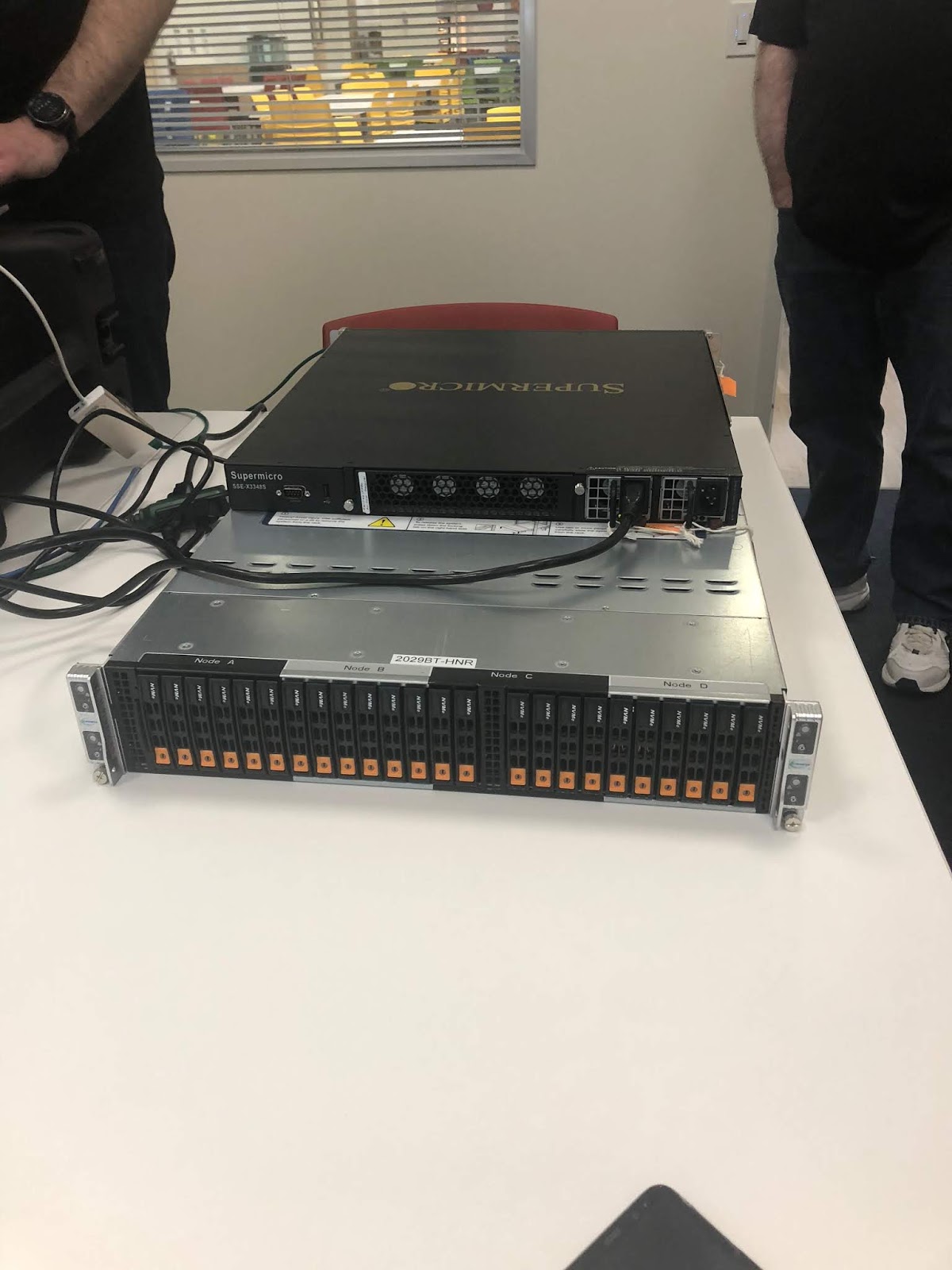
Up until Build Day Live, I had no idea that SuperMicro was in the networking space. They offer a wide array of products from 1 to 100GB in a 1U chassis. These switches are bare metal, and are compatible with the Cumulus Linux networking operating system. SuperMicro also has its own proprietary NOS for the 1GB switches as well. Configuration can be completed via CLI or GUI, making management easy for admins at all skill sets.

JBOF Disaggregated Storage

Outside of the server hardware we all know, SuperMicro also has a deep selection of storage hardware. Of the two storage specific segments of SuperMicro Build Day, I was most interested in the JBOF/NVMe storage. During this segment, Alastair spoke to Mike Scriber. To quote Mike, "I design really, really cool storage systems using NVMe. Very high density systems." And when you look at what SuperMicro is up to, he's right.


Utilizing the Intel Ruler NVMe form factor, SuperMicro is quickly closing in on 1 petabyte of storage in a 1U rack chassis. The chassis has slots for 32 "rulers" that connect into 16 lanes of PCIe leading to 4 ports which allows for 64gb/s bandwidth. Another interesting feature of both the ruler form factor and the standard U.2 chassis is the engineering of the back planes. The back planes run parallel to the ruler form factor, and across the top of the U.2 drives. This design helps to keep densely packed 1U chassis cool with limited to no blocks in the airflow.

There were a lot of aspects to the SuperMicro Build Day Live event worth checking out, lots more than commented on in this post! Check out the links below for all of the videos from the event.

Links:

SuperMicro Build Day - Condensed
vBrownBag YouTube SuperMicro Build Day Live Videos
The CTO Advisor - SuperMicro Build Day Interviews
Anthony Hook's SuperMicro Build Day Blog Post
vBrownBag.com - SuperMicro Build Day Live
vBrownBag on Twitter
SuperMicro's Web Site

If you'd like to continue the conversation about SuperMicro Build Day Live, do not hesitate to contact me via any of the channels provided below. Do you have an idea or a topic for the blog? Would you like to be a guest on the ExploreVM podcast? If so, please contact me on Twitter, Email, or Facebook.

Thursday, August 2, 2018

Getting Started with StorMagic SvSAN - A Product Review


Getting Started with StorMagic SvSAN - A Product Review

Recently, I had the opportunity to try out StorMagic SvSAN in my home lab to see how it stacks up. The following is an introduction to SvSAN, a description of the deployment, testing, testing results and my findings. 


What is StorMagic SvSAN 6.2?

StorMagic SvSAN provides a Hyperconverged solution that has been designed with the remote office/branch office in mind. Two host nodes with onboard storage can be utilized in a shared storage style deployment in locations where a traditional 3 tiered architecture would prove to be difficult to manage or too cost prohibitive.  SvSAN is vendor agnostic so it can be deployed onto existing infrastructure without the need to acquire additional hardware. The two storage nodes can scale out to support up to 64 compute-only nodes. Licensing is straight forward: perpetual license per pair of clustered storage nodes as one license per pair. Initial pricing is also very accessible, starting at approximately $4,000 for the first 2TB license. Licensing and capacity can scale beyond the initial 2TB.


When asked about their typical customer base, StorMagic provided the following response: "StorMagic SvSAN is designed for large organizations with thousands of sites and companies running small data centers that require a highly available, two-server solution that is simple, cost-effective and flexible. Our typical customers have distributed IT operations in locations like retail stores, branch offices, factories, warehouses and even wind farms and oil rigs. It is also perfect for IoT projects that require a small IT footprint, and the uptime and performance necessary to process large amounts of data at the edge."


Technical Layout of SvSAN

A typical SvSAN deployment consists of the following base components: hypervisor integration, Virtual Storage Appliances, Neutral Storage Host. In my lab environment, I used VMware vSphere, but StorMagic does offer support for Hyper-V as well. A plugin is loaded into the vCenter Server and provides the dashboard for management and deploying the VSAs. Following the wizard, a Virtual Storage Appliance is deployed on each host and the local storage is presented to the VSA. Before creating storage pools the witness service (Neutral Storage Host) must be deployed external to the StorMagic cluster. The NSH can be deployed on a server, Windows PC, or Linux. It is light weight enough that it can run on a Raspberry Pi.


SvSAN 6.2 introduced the ability to encrypt data. A key management server is required for encryption. For this evaluation, I installed Fornetix Key Orchestration as the KMS. Encryption options available include encryption of a new datastore, encryption of an existing datastore, re-keying a datastore, and decrypting the datastore. As I was curious to as what kind of performance hit encryption may have against the environment, I ran my tests against the non-encrypted datastore, then again after encrypting it.


Deployment and Testing

The overall installation process is fairly straight forward. StorMagic provides an Evaluators guide which outlines the installation process, and their website has ample documentation for the product. I had to read through the documentation a couple of times to fully understand the nuances of the deployment. I did encounter a few hiccups during deployment, one IP issue which I resolved and a timeout on the VSA deployment. I did need to contact support to release the license for the Virtual Storage Appliance which timed out, but support was responsive and resolved my issue quickly. The timeout may have been tied to the IP issue as the VSA deployed successfully on the second attempt.


With the underlying infrastructure in place, a shared datastore was deployed across both host nodes. Now the testing could begin. A Windows Server 2012 R2 virtual machine was deployed on the SvSAN datastore to run performance testing against. The provided Evaluation Guide gives many suggested tests to put the SvSAN environment through its paces. As I mentioned previously, I ran the tests against an encrypted datastore, a non-encrypted datastore, and a local datastore.


Following the guidelines set forth by the Evaluation Guide, Iometer was the tool of choice for performance benchmarking. Below is a chart of the metrics used. Outside of the suggested performance testing I also ran various tests to see what the end user experience could feel like on a SvSAN backed server. These tests included RDP session into the VM, continuously pinging locations internal and external to the network, and running various applications.


The final tests ran against the SvSAN cluster included failure scenarios and how it would impact the virtual machine. Drives were removed, connectivity to the Neutral Storage Host was severed, iSCSI & cluster networking were removed. An interesting aspect to the guide is that it gives you testing options to cause failures that will affect VMs running on the SvSAN datastore so you can see first-hand how the systems will handle the loss of storage.


SvSAN Results & Final Thoughts


Performance testing ran against the VM on the SvSAN datastore provided positive results. I was curious as to whether passing through an additional step in the process would affect IOPS, but there were only nominal differences between the local storage and the SvSAN datastore. I found the same to be true when it came to running an encrypted versus a non-encrypted datastore. IOPS performance held steady across all testing scenarios.


The same was true with the user experience performance testing. While running Iometer, Firefox, a popular chat application, and pinging a website the following failures were introduced to no impact:


  • hard drives were remove
  • a Virtual Storage Appliance was powered down
  • an ESXi host was shut down
  • Connectivity to the Neutral Storage host was severed


I was impressed with my experience with StorMagic's SvSAN. From no prior exposure to running production ready datastores in approximately an hour. The solution performed well under duress. Overall, StorMagic SvSAN is an excellent choice for those in need of a solid remote office/branch office solution that is reliable and cost effective.


Lab Technology Specifications:

  • Two Dell R710s
  • 24 GB RAM each
  • 2x X5570 Xeon 2.93 GHz 8M Cache, Turbo, HT, 1333MHz CPU Each
  • One 240 GB SSD drive for caching in each host
    • Presented as a single 240 GB pool from the RAID controller
  • 5 x 600 10k SAS drives configured in RAID 5
    • Presented as two pools; 400GB & 1.8 TB
  • VMware vCenter Server Appliance 6.5
  • VMware ESXi 6.5 U2 Dell Custom ISO
  • Cisco Meraki MS220 1GB Switching 

Further reading on StorMagic:
SvSAN Lets You Go Sans SAN 
 
This blog was originally published at Gestalt IT as a guest blog post. 

If you'd like to continue the conversation about StorMagic SvSAN, do not hesitate to contact me via any of the channels provided below. Do you have an idea or a topic for the blog? Would you like to be a guest on the ExploreVM podcast? If so, please contact me on Twitter, Email, or Facebook.

Sunday, June 3, 2018

ExploreVM Podcast - Nutanix .Next 2018 Review

On this episode of the ExploreVM podcast, we take a look back at the Nutanix .Next conference. New Orleans played host to the 2018 Nutanix .Next conference. This year marked my 3rd consecutive year attending, and 2nd as a Nutanix technology champion. Communities manager Angelo Luchiani had plenty of surprises lined up for us, including having myself and other NTCs arrive at the Opening Keynote in a Mardi Gras float. He's also done an excellent job expanding a communities area, creating lightning tech talks, and providing an area for podcasters. I made sure to take full advantage of the space and pin down a few interviews for a short wrap up podcast.

In the first two segments, I chat with Angelo and Mike Gelhar about what's going on in the world of Nutanix followed by a discussion on Nutanix certification. The final segment is a bit of a one off, but it's relevant to those of us who do a lot of travel for work. There were several major product announcements made at the conference. My personal favorite is Beam. I've linked a few blog posts from fellow NTCs about these announcements in the show notes, and I will have my own post up in the near future. I hope you enjoy.


Listen to "2018 Nutanix .Next Wrap Up" on Spreaker.

Here I am giving my Lightning Tech Talk. 
My Guests:
Angelo Luciani
Mike Gelhar
René van den Bedem
Ken Nalbone
Brandon Graves

NTC Nutanix .Next Announcement Posts
https://vcdx133.com/2018/05/09/nutanix-next-us-announcements/
http://www.techspresso.com/nutanix-next-2018-summary/
https://www.racscale.com/2018/05/09/next-2018-xtract-x-ray-updates/
https://www.racscale.com/2018/05/09/next-2018-nutanix-flow/
https://alarasheedblog.wordpress.com/2018/05/09/next-experience-day-1/


Blog: www.ExploreVM.com
Twitter: https://twitter.com/ExploreVM
Instagram: https://www.instagram.com/explorevm/
LinkedIn: https://www.linkedin.com/in/paul-woodward-jr


Do you have an idea or a topic for the show? Would you like to be a guest on the ExploreVM podcast? If so, please contact me on Twitter, Email, or Facebook.


Tuesday, April 17, 2018

Top 3 Features of Nutanix AOS 5.6

On April 16th, Nutanix released it's newest version of AOS (Acropolis Operating System). The 5.6 release has 9+ new features. But rather than cover them all, I wanted to call out what I consider the top 3 features of this release.

One or Two Node Deployment for Remote / Branch Office

Many businesses face the challenge of maintaining IT resources in remote locations. Whether it be a branch office or retail outlet, choosing the right solution to provide infrastructure which is easy to deploy and manage can prove difficult. Enter AOS 5.6. With this release, Nutanix now offers a single or dual node solution for ROBO deployment. The single node deployment can support up to 5 VMs, with disk level resiliency. The two node option supports up to 10 VMs and offers node level resiliency. Both options are managed centrally via Prism Central, allowing admins to administer the nodes alongside their on-premises data center. ROBO sites can also utilize cross hypervisor DR between the remote site and the DR location. And with all other Nutanix, the ROBO sites can be remotely upgraded using the same 1 click upgrades as the local site, saving the complexity of keeping a remote office up to date.

Microsegmentation hits GA

AHV users can now benefit from the GA release of Microsegmentation. Built into 5.6 and managed via Prism, application centric policy models can be deployed using a stateful distributed firewall. Single virtual machines or groups of VMs can all be protected, including blocking east/west traffic between them. Microsegmentation offers granular application isolation and zoning without configuring VLANs.

Volume Group Load Balancing of vDisks 

For users with high IO VMs, AOS 5.6 includes the ability for AHV to load balance vDisks in a volume group. CPU and memory resources are pulled from multiple CVMs (Controller VMs). This distribution across CVMs helps to improve the performance of the virtual machine and reduce bottlenecks.

Related links

What's New | AOS 5.6 - Nutanix
VCDX133.com - Nutanix AOS 5.6 Released
VCDX56.com - Nutanix AOS & Prism Central Version 5.6 & Much More Released

Do you have an idea or a topic for the blog? Would you like to be a guest on the ExploreVM podcast? If so, please contact me on Twitter, Email, or Facebook.
Monday, April 2, 2018

ExploreVM Podcast - Maintaining Work Life Balance w/ Heather & Nigel Hickey

On this episode of the ExploreVM Podcast, we take a look at keeping the band, or in a more realistic setting, the family together when you and your partner are both working professionals.


Listen to "Maintaining a Work Life Balance w/ Heather & Nigel Hickey" on Spreaker.


As we all strive to succeed in business, its important to keep your family in mind as well
I know i could not have achieved half of what ive accomplished in my career if it wasnt for buy in and support from my family.

Be sure to take some time away from your job, studies, or projects and keep those loved ones close.

Links
Nigel on Twitter
Heather on Twitter
http://nigelhickey.com/
Heather & Nigel's Spiceworld Presentation
Heather & Nigel on The Geek Whisperers


Do you have some tips on work life balance? Do you have an idea or a topic for the show? Would you like to be a guest on the ExploreVM podcast? If so, please contact me on Twitter, email, or Facebook.

Monday, February 19, 2018

ExploreVM Podcast - So You Want to be an Author? w/Melissa Palmer

So you want to be an author? Learn about the fabulous world of writing, editing, publishing, and eventually swimming in a pool filled with money Scrooge McDuck style from a recently published author on this episode.

Listen to "So You Want to be an Author? w/Melissa Palmer" on Spreaker.

Links:
Melissa's Site
IT Architect Journey

Twitter
@ITArchJourney
@vmiss33

Would you like to join the conversation on today's episode, want to be a guest on the podcast, or have an idea for a future episode?  Reach out to me on Twitter, ExploreVM, email, or Facebook. Once again, thank you for listening.

Monday, February 5, 2018

ExploreVM Podcast - Predicting Tech in 2018 - Season 2 Episode 1

In the first episode of season 2, we take a look a the future of IT, all the way to the year 2018.

Listen to "ExploreVM Podcast" on Spreaker.

This Episode's Guests:

Adam Bergh

Edward Haletky
Brian Kirsch
Jon Hildebrand
As always, thank you for listening. If you'd like to be a guest on the ExploreVM podcast, have a show idea for a future episode, or continue the conversation on today's topics, please contact me at Email, Facebook, or Twitter

Sounds and music clips provided by kennysvoice, aceinet, and Robinhood76 on Freesound.org.


Wednesday, January 10, 2018

Riverbed Steel Fusion: A New Approach to Remote Office Infrastructure

Riverbed Steel Fusion: A New Approach to Remote Office Infrastructure  


Approaching the remote office/branch office (ROBO) deployment can be a more complicated task than it originally appears. Many vendors in this space offer a quick deployment, but fail to look deeper into the needs of the business to provide a well rounded solution. How does a business plan for disaster recovery at a remote site? What about offices in foreign countries? Data location and international laws could complicate the ability to protect intellectual property of the business. Enter Riverbed Steel Fusion. Steel Fusion offers administrators simplified ROBO deployments, centralized management, and provides options for problems that could be easily overlooked when planning for remote offices.   

What is the SteelFusion Solution?


SteelFusion is a Software-Defined Edge solution consisting of a two parts: Core and Edge. In the on-premises data center, the SteelFusion Core (a physical appliance or virtual machine) is connected to the SAN or NAS storage. It should be noted that the SteelFusion core can also be linked to AWS or Azure storage components for those with a multi-cloud solution. The SteelFusion Edge appliance is deployed at the remote site. Once the base network configuration is made, the appliance is remotely managed from the Core.


Riverbed's Parimal Puranik white boarding SteelFusion at TFD15

How does SteelFusion differentiate from other ROBO solutions?


SteelFusion separates itself from the pack by keeping corporate data housed in the main data center. With the data on-premises, planning for backup and disaster recovery is simplified to one site. No need to develop a complicated solution encompassing multiple remote offices. Similarly, since data lives in the SAN/NAS, it becomes less vulnerable to foreign data laws. The data required by the ROBO, whether it be files or VM disks, is replicated and cached to the Edge, and changes are written back to the SAN/NAS at the Core.

Aside from passing the data to the remote site, the Edge appliance can also replace traditional compute solutions with Riverbed’s Virtual Services Platform. VSP runs VMware ESXi to on the SteelFusion Edge appliance, eliminating the need for additional hardware.

On paper the solution seems solid, but does it hold up in the real world? The answer appears to be yes. Based on statistics provided by Riverbed in September of 2017, there are over 10,000 appliances deployed across 1,200 customers globally. From experience in my professional life, installation and management is easy. I have encountered a few enterprises in my area currently utilizing SteelFusion, or with plans to implement SteelFusion in 2018. While it may not be a perfect solution for every ROBO use case, SteelFusion is certainly worth investigating.

For a deeper overview of Riverbed’s SteelHead technology, check out their presentation at Tech Field Day 15 Here.


Disclaimer: I was invited to participate as a Tech Field Day Delegate as a guest of Gestalt IT. All expenses, including food, transportation, and hotel were covered by Gestalt IT. I did not receive any compensation to write this post, nor was I requested to write this post. The above post is written of my opinion and not that of Gestalt IT.

Thursday, January 4, 2018

That's a Wrap: An ExploreVM Look Back at 2017

One word comes to mind as I sit here and look back at 2017 and the adventures I've had with the ExploreVM blog/podcast - Growth. I am thankful to be part of a great community that has provided new opportunities, new ventures, and new experiences. I haven't been nearly as productive on the blog/podcast front in November and December of last year due to some personal matters, getting slammed with work, and the holiday. So, let's kick off 2018 with a review of 2017, and a preview of things to come.

Community Recognition


For the second year in a row, I was privileged enough to be part of the VMware vExpert program. I often tell people that just because I am a "vExpert", it doesn't mean that I know everything about VMware. And man is that true when immersed in the vExpert Slack channels or conversating with vExperts at events. I've learned so much from fellow vExperts in the past year that I couldn't begin to thank everyone who's knowledge I've grown from.

I also took a crack at applying for another community program, and to my surprise I was accepted. I was named one of the 150 Nutanix Technology Champions for 2017. What I like about the NTC program is that it is smaller than similar groups which gives individuals a better experience. There are a great group of technologists in the NTC program which have helped me grow my skill set immensely since I joined. Angelo Luciani runs a great program at Nutanix!  

Blogging and Podcasting


As an accompaniment to the blog I've been running for four years, I dove into the world of podcasting. The first season of the ExploreVM podcast launched in February with15 episodes focusing on various topics in the datacenter realm. It's been great to follow the career journey of my guests after their appearance on the show.

In January I will begin recording episodes for Season 2, which I plan on kicking off in February. The goal is to publish an episode every two weeks. I'm looking for guests, so please do not hesitate to reach out on Twitter or drop me an email if you want to appear. I'd like to bring on some new voices and perspectives in the next season. Let's explore the datacenter world together!

On the blog front, 2017 marked my most productive year with 14 posts. The vExpert and Nutanix NTC program provided lots of great access to products and announcements, which in turn lead to numerous posts. With added posts, comes added readership as well. A bit of a humble brag, but ExploreVM.com saw a 325% increase in hits from EOY 2016 to EOY 2017. If everything I've got lined up works out as planned, including a new website design, 2018 should see the same growth!

As we look forward into 2018, I have several posts lined up as a result of Tech Field Day. As we go forward, I see the ExploreVM blog taking more of an analyst route.. However, that does not mean that my event recaps or technical posts are going away, they will just occur a bit less often. Diving into technologies, learning what makes them work, and figuring out where they fit in the datacenter world has become not only beneficial to my professional life, but a very enjoyable aspect of my writing.

I have also launched a YouTube channel which I will be publishing videos on various topics. I expect these videos will parallel some of the podcasts, or be informative similar to VMUG sessions. This will be a new venture for me into 2018, but all of my previous podcasts are available there currently for review.

One more thought on the content creation front. As growing the blog and podcast is starting to incur some costs, namely hosting, software, and recording equipment, I am considering doing some sponsored content. This would be done in lieu of running ads. I find sponsored content to be less intrusive than ads on sites and podcasts, and when done properly, the posts can have quality content. If your company or product would like to sponsor a post or episode, please email me, or message me on Twitter.

Speaking and Events


The core of my community involvement has always been attending and speaking at VMUG meetings, and 2017 was no different. This year I added Keynote Panel speaker to the resume on top of my usual community sessions. Indianapolis, Chicago, and Wisconsin VMUGs were all gracious enough to allow me to speak at their UserCon's this past year. I take so much joy in giving back to the community that has helped my career explode. 

If you have never spoken at a VMUG meeting, please consider doing so. Community generated content is always in demand. Many people out in the vCommunity, myself included, are more than willing to coach you on your session. Like I mentioned before, everyone has useful experience, don't be afraid to share. 

This year had two new speaking firsts. March led off with a pre-recorded webinar that was sponsored by Intel and Nutanix. The recording experience was a touch nerve racking as I had no idea how I looked or sounded until the webinar aired. That being said, I would absolutely do it again. Community involvement led to speaking at two conferences during the summer of 2017. 

My final event for 2017 was an invitation to Tech Field Day 15 in San Jose, California. What's unique about the TFD15 experience versus my other events for the year is that the delegates get to grill the vendors and learn about products rather than having to speak on a topic. We were either  brought to the offices of the vendor, or they came to our location, and we were granted access to everyone from engineers to CEOs. While I am slipping a bit in the timeliness department, look for blog posts about these vendors in the coming weeks. Outside of the Tech, I got to meet, chat with, and learn some amazing folks in our industry. They certainly lit a fire underneath me to do more with myself after spending just a few days in their company. 

Now, if you'll excuse me, I have to get on to writing other blog posts and working on the website redesign. One last bit of info, I've included some of my goals for 2018, as well as some blog and podcast stats for last year. 

Goals for 2018

  • AWS Certified Solutions Architect - Associate & Professional
  • VMware VCIX
  • Attend/speak at 3 conferences
  • Speak at a VMUG in a state that I have not spoken in before
  • Hit 2000 Twitter followers (currently at 940)

Podcast Stats

  • Number of Podcast Downloads: 1149
  • Number of Plays on ExploreVM.com: 288
  • Listeners on 5 Continents 

Top 3 Downloaded Episodes

  1. Making the Move to a Pre-Sales Role / VMware 101 (tie)
  2. IT User Groups
  3. Microsoft Azure

Top 3 Played Episodes (on the blog)

  1. A VCDX Discussion
  2. Making the Move to a Pre-Sales Role
  3. On-Premises Datacenter is Dead, Long Live On-Premises Datacenter

Blog Stats

  • 325% increase in views in 2017
  • Readers From 6 Continents 

I hope everyone had a great holiday, and has an amazing 2018. I welcome any feedback on my previous posts, podcasts, or any of the upcoming ideas I've mentioned in this blog. And as always, if you'd like to be a guest or have an idea for an episode of the ExploreVM podcast, reach out to me on Twitter, Facebook, or Email.

Tuesday, October 31, 2017

ExploreVM Podcast - Episode 15: Mathematics of Dataloss with Dr. Rachel Traylor

Today we take a look into a world that I find fascinating and have limited experience with: Mathematics. Specifically the math behind some datacenter functions. We even brought in a real live doctor of mathematics to talk about it!  Let's take a listen.


Listen to "Mathematics of Dataloss with Dr. Rachel Traylor" on Spreaker.


Watch for some upcoming videos done in conjunction with The Math Citadel about various tech topics and the mathematics behind them.

To Contact Dr. Traylor
Personal Twitter
The MathCitadel Twitter
TheMathCitadel.com
The Article Discussed in this Episode


If you'd like to join the conversation about the show's topic, have any show ideas, or would like to be a guest, reach out to me on Twitter (@ExploreVM), Email, or on Facebook.